

The $1500 gaming PC market in 2026
Buying a gaming PC for under $1500 in 2026 is finally a fair deal. Prices are stable, and you can get current-gen hardware without the massive markups we saw a few years ago. It is the best price point for anyone who wants high frame rates but doesn't need a $4,000 status symbol.
Realistically, at this price point, you’re aiming for a fantastic 1440p gaming experience, and potentially some 4K gaming with dialed-down settings. Don't expect to max out every game at ultra settings, especially the newest, most demanding titles. The focus is on finding the best balance between performance and cost.
Prebuilt PCs dominate this segment, as building your own can sometimes be more expensive given current market conditions and retail markups on individual components. However, prebuilts require careful scrutiny to ensure quality components are used and that you’re not overpaying for features you don't need. It's a buyer's market, but only for those who do their research.
The market is flooded with options, and it’s easy to get lost in the specs. We’re seeing a lot of systems using AMD Ryzen 7000 and Intel Core i5 14th generation processors, paired with GPUs like the NVIDIA GeForce RTX 4060 Ti and AMD Radeon RX 7700 XT. This is a solid foundation for modern gaming, but the details – like RAM speed and SSD capacity – really matter.
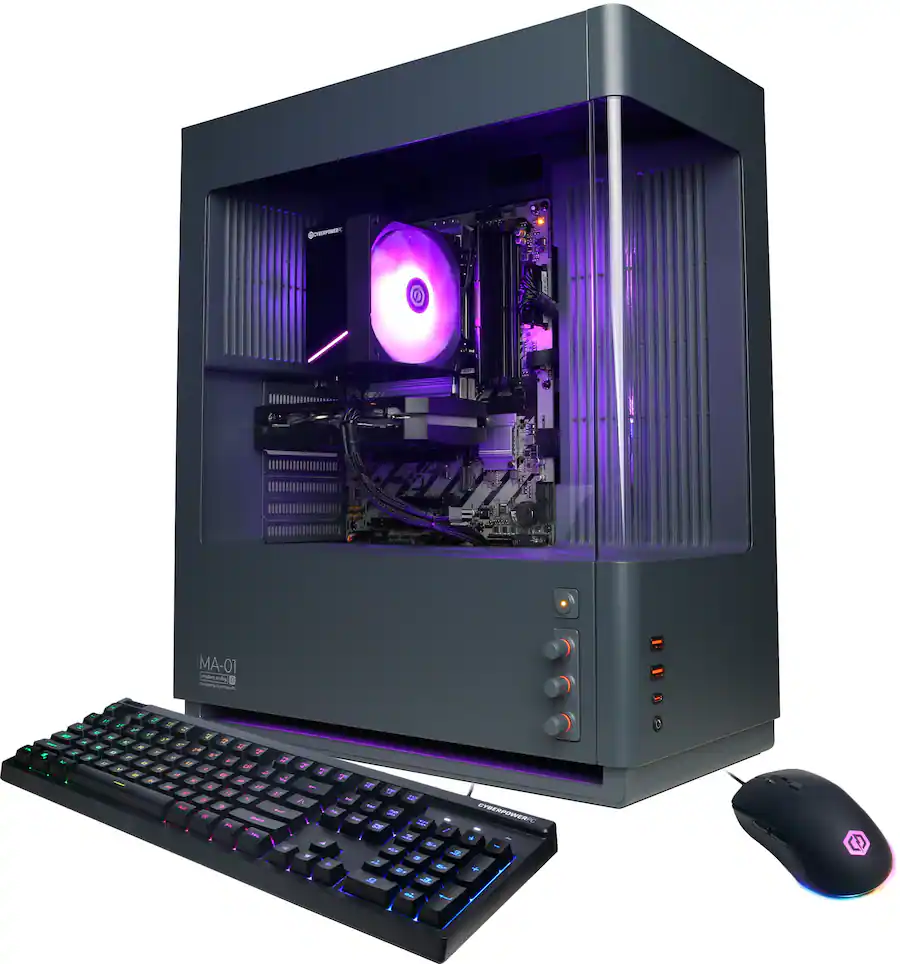
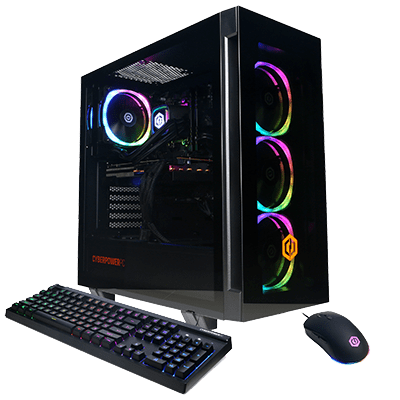
CyberpowerPC: the king of customization
CyberpowerPC has built a reputation for offering an enormous degree of customization. Their website allows you to configure almost every aspect of your system, from the case and cooling solution to the motherboard and storage. This is a huge advantage for gamers who have specific preferences or want to tailor a build to their exact needs. They generally offer competitive pricing, but the final cost depends heavily on your choices.
Build quality is a bit of a mixed bag, according to recent reviews. While CyberpowerPC generally uses reliable components, cable management can sometimes be sloppy, and the aesthetic isn’t always as refined as some other brands. However, they've been making improvements in this area, and many users report a satisfactory build experience. It’s important to read reviews for the specific configuration you’re considering.
Shipping is the main headache here. If you customize every part, expect to wait. In late 2026, most orders took two to four weeks to arrive. PCMag's 2026 testing confirmed that Cyberpower is consistently slower than its rivals.
As of late 2026, a good configuration under $1500 might include an Intel Core i5-14600K, an NVIDIA GeForce RTX 4060 Ti 16GB, 32GB of DDR5 RAM, and a 1TB NVMe SSD. CyberpowerPC’s Gamer Master series offers several options in this range. Their Gamer Xtreme VR Gaming PC, configured with similar specs, frequently appears around the $1400 mark.
CyberpowerPC also offers a wide selection of cases, allowing you to choose one that matches your aesthetic preferences. They consistently update their offerings, so it’s worth checking their website regularly for new deals and configurations. The ability to select individual components is a definite plus for those who want a personalized experience.
Skytech Gaming: better value, fewer frills
Skytech Gaming has quickly gained popularity for its focus on providing excellent value for the money. They tend to offer prebuilt systems with competitive specs at lower price points than many of their rivals. This is achieved through efficient component sourcing and streamlined build processes. They’re a strong contender for gamers on a tighter budget.
The question often arises: are they cutting corners to achieve these lower prices? Generally, the answer is no. Skytech typically uses reputable components from well-known brands. However, they may opt for slightly less flashy aesthetics or more basic cooling solutions compared to some other vendors. It's a trade-off between features and price.
You can often find Skytech Gaming PCs with an AMD Ryzen 5 7600X or Intel Core i5-13600K paired with an AMD Radeon RX 7700 XT or NVIDIA GeForce RTX 4060 Ti for under $1500. They focus on maximizing gaming performance for the price, which is appealing to many users.
Customer service is where Skytech Gaming sometimes falls short. Reports indicate that their support can be inconsistent, with some users experiencing long wait times or difficulty resolving issues. While many customers have positive experiences, it’s a potential risk factor to consider. Compared to CyberpowerPC, Skytech’s customization options are significantly more limited.
Skytech’s approach appeals to gamers who prioritize performance over bells and whistles. They aren’t trying to offer the most luxurious or visually stunning builds; they’re focused on delivering a solid gaming experience at an affordable price. This makes them a compelling option in the crowded sub-$1500 market.
Featured Products

Ryzen 7 5700 processor · NVIDIA RTX 5060 Ti graphics card · 32GB DDR4 RAM
This Skytech Nebula offers a strong configuration with a Ryzen 7 CPU and RTX 5060 Ti, providing excellent performance for its price point.

AMD Ryzen 7 7800X3D processor · NVIDIA RTX 5060 Ti graphics card · 32GB DDR5 RAM
While slightly above the $1500 mark, the Archangel 5 delivers top-tier gaming performance with its Ryzen 7 7800X3D and RTX 5060 Ti, justifying the investment for serious gamers.

Ryzen 5 5500 processor · NVIDIA RTX 3050 graphics card · 16GB DDR4 RAM
The Skytech Nebula provides a budget-friendly entry point with capable components for 1080p gaming, making it an attractive option for those prioritizing affordability.

Ryzen 7 7700X processor · NVIDIA RTX 5070 graphics card · 32GB DDR5 RAM
The Chronos 3 is a powerhouse exceeding the $1500 budget, featuring a high-end Ryzen 7 CPU and RTX 5070 for exceptional performance in demanding titles.
As an Amazon Associate I earn from qualifying purchases. Prices may vary.
ASUS Gaming: paying for the brand name
ASUS is widely regarded as a premium brand in the PC gaming world, known for its high-quality components and innovative designs. Their prebuilt gaming PCs reflect this reputation, often featuring sleek aesthetics, robust build quality, and advanced features. However, this premium quality typically comes at a higher price.
When it comes to prebuilt systems under $1500, ASUS’s options are more limited. You’re likely to find configurations focused on balancing performance and aesthetics, but you may have to make some compromises in terms of raw horsepower. They tend to prioritize a polished overall experience over maximizing specs.
ASUS ROG Strix and TUF Gaming models are the most common options in this price range. These systems often feature distinctive designs, RGB lighting, and high-quality components. However, you might find that they’re equipped with slightly less powerful GPUs or CPUs compared to comparable CyberpowerPC or Skytech builds.
Do you get a noticeable improvement in build quality with ASUS? In many cases, yes. ASUS generally pays close attention to detail, with clean cable management and a well-organized interior. However, the difference may not be significant enough to justify the extra cost for all gamers. It really depends on your priorities.
As of late 2026, an ASUS ROG Strix G15 Gaming PC with an Intel Core i5-14400F, NVIDIA GeForce RTX 4060, 16GB of RAM, and a 512GB SSD can be found around $1300-$1400. It’s a solid system, but you might get more raw performance for your money with a similarly priced CyberpowerPC or Skytech build.
Component Breakdown: What You Get for Your Money
Let’s break down the typical components you’ll find in $1500 gaming PCs from each brand. The GPU is the most critical component for gaming performance, so we’ll start there. CyberpowerPC and Skytech often offer configurations with NVIDIA GeForce RTX 4060 Ti 16GB or AMD Radeon RX 7700 XT GPUs, while ASUS tends to lean towards the RTX 4060.
In terms of CPUs, all three brands frequently use Intel Core i5-14600K or AMD Ryzen 5 7600X processors. These are both capable CPUs that provide excellent gaming performance. However, the Ryzen 5 7600X generally consumes less power and runs cooler.
RAM is another important factor. Most systems will include 32GB of DDR5 RAM, which is the sweet spot for modern gaming. The speed of the RAM can also impact performance, so look for kits with speeds of 5200MHz or higher. ASUS often includes slightly faster RAM kits in their builds.
Storage typically consists of a 1TB NVMe SSD for the operating system and games. Some systems may also include a larger HDD for additional storage, but an SSD is essential for fast loading times and a responsive gaming experience. CyberpowerPC offers the most storage customization options.
Finally, the power supply is a crucial component that often gets overlooked. Look for a power supply with at least 650W of power and an 80+ Bronze or Gold certification. ASUS typically includes high-quality power supplies in their builds, while CyberpowerPC and Skytech may sometimes use less expensive options.
- GPU: Cyberpower and Skytech usually pack an RTX 4060 Ti (16GB) or RX 7700 XT, while ASUS often sticks to the base RTX 4060.
- CPU: Intel Core i5-14600K or AMD Ryzen 5 7600X
- RAM: 32GB DDR5 (5200MHz+)
- Storage: 1TB NVMe SSD (plus optional HDD)
- Power Supply: 650W 80+ Bronze/Gold
Gaming PC Component Comparison (Under $1500 - 2026 Estimates)
| Brand | GPU (Typical) | CPU (Typical) | RAM (Capacity & Speed) | Storage (Type & Capacity) | Power Supply (Wattage & Rating) |
|---|---|---|---|---|---|
| CyberpowerPC | NVIDIA GeForce RTX 4070 | Intel Core i5-14600K | 16GB DDR5 5600MHz | 1TB NVMe SSD | 650W 80+ Gold |
| Skytech Gaming | AMD Radeon RX 7800 XT | AMD Ryzen 7 7700X | 32GB DDR5 5200MHz | 1TB NVMe SSD + 2TB HDD | 750W 80+ Gold |
| ASUS ROG | NVIDIA GeForce RTX 4060 Ti | Intel Core i5-14400F | 16GB DDR5 4800MHz | 512GB NVMe SSD + 1TB HDD | 600W 80+ Bronze |
| CyberpowerPC | AMD Radeon RX 7700 XT | AMD Ryzen 5 7600X | 16GB DDR5 5200MHz | 1TB NVMe SSD | 650W 80+ Bronze |
| Skytech Gaming | NVIDIA GeForce RTX 4060 Ti | Intel Core i5-14400F | 16GB DDR5 4800MHz | 1TB NVMe SSD | 650W 80+ Gold |
| ASUS ROG | AMD Radeon RX 7600 | Intel Core i5-13600K | 16GB DDR4 3200MHz | 512GB NVMe SSD | 550W 80+ Bronze |
Illustrative comparison based on the article research brief. Verify current pricing, limits, and product details in the official docs before relying on it.
Performance in Key 2026 Titles
Let’s look at expected performance in some popular 2026 titles. In God of War Ragnarok PC, a system with an RTX 4060 Ti and a Ryzen 5 7600X should be able to achieve 60-80 FPS at 1440p with high settings. Dropping to medium settings could push that closer to 90-100 FPS.
Ghost of Tsushima PC is another demanding title. Expect around 50-70 FPS at 1440p with high settings. Again, reducing settings will improve performance. PC Reef’s reviews of both games indicate that CPU performance is also a factor, so a Ryzen 5 7600X or Core i5-14600K is recommended.
With the release of Monster Hunter Wilds in 2026, performance expectations are a bit more uncertain. Early benchmarks suggest that the game is quite demanding, even more so than Ghost of Tsushima. A system with an RTX 4070 would be ideal, but an RTX 4060 Ti should still be able to deliver a playable experience at 1080p or 1440p with optimized settings.
ASUS systems, with their potentially slightly less powerful GPUs, might see a 5-10% performance decrease in these titles compared to similarly priced CyberpowerPC or Skytech builds. However, the difference may not be noticeable in all cases, especially if you’re not pushing for the highest possible frame rates.
These numbers are estimates. Your actual frame rates will shift depending on your background apps and specific in-game settings. I always recommend checking a few YouTube benchmarks for your specific GPU before buying.
Warranty, Support, and Long-Term Considerations
Warranty coverage varies between brands. CyberpowerPC typically offers a one-year warranty on parts and labor, while Skytech Gaming offers a similar warranty. ASUS generally offers a two-year warranty on their prebuilt systems, which is a definite advantage. It’s important to read the fine print of the warranty to understand what is covered and what is not.
Customer support experiences also differ. As mentioned earlier, Skytech Gaming’s support can be inconsistent. CyberpowerPC’s support is generally considered to be adequate, but it can sometimes be slow to respond. ASUS is known for its excellent customer service, but it may be more difficult to get in touch with them if you have a complex issue.
Upgradeability is another important consideration. Most prebuilt PCs allow you to upgrade components like the RAM and storage, but some have limited upgrade paths for the CPU or GPU. Skytech and CyberpowerPC generally offer more flexible upgrade options than ASUS, which tends to use proprietary components in some of their builds.
Return policies also vary. CyberpowerPC and Skytech Gaming typically offer a 30-day return policy, while ASUS’s return policy may be more restrictive. It’s important to check the return policy before making a purchase, in case you’re not satisfied with the system.
Thinking long-term, consider the potential for future upgrades. A well-built PC with a good power supply and motherboard can be upgraded over time to keep it relevant for years to come. Choosing a system with good upgradeability can save you money in the long run.
No comments yet. Be the first to share your thoughts!