

The $1500 Gaming PC Sweet Spot: Why Prebuilts Are Trending in 2026
PC prices in 2026 are still volatile. While the shortages of the early 2020s are over, building a machine takes hours many people don't have. A $1,500 prebuilt is the most practical choice right now. It's enough money to run modern titles at 1440p without overspending on parts you won't use.
Building your own PC offers ultimate customization, but it isn’t for everyone. Sourcing compatible parts, ensuring proper cooling, and the sheer time commitment are hurdles many gamers are eager to avoid. Prebuilts sidestep these issues, offering a convenient, ready-to-play experience. However, this convenience often comes with trade-offs, and quality can vary significantly between manufacturers.
That’s where companies like CyberpowerPC, Skytech Gaming, and ASUS come in. They all compete for a slice of the $1500 gaming PC market, but they approach it with different philosophies. CyberpowerPC emphasizes customization, Skytech focuses on value, and ASUS leans into brand recognition and premium build quality. Understanding these differences is key to choosing the best option for your needs.
Ultimately, the $1500 price point is attractive because it allows for a system capable of playing demanding titles at 1440p with respectable frame rates or 1080p with very high frame rates. It’s a solid entry point for serious gaming, and the prebuilt market is responding to that demand.
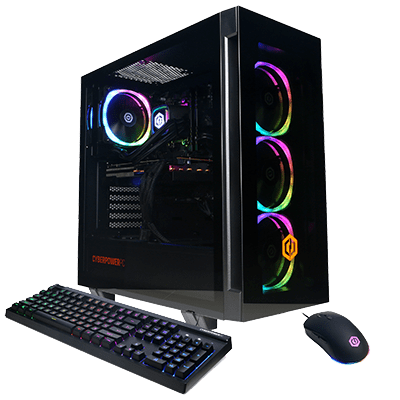
CyberpowerPC: Customization King or Cost-Cutting Corner Cutter?
CyberpowerPC has built a reputation for offering an extensive level of customization. Their website allows you to configure nearly every aspect of your build, from the case and cooling solution to the specific model of RAM and storage. This is a major draw for gamers who want a PC tailored to their exact specifications. They also frequently run promotions and offer financing options, making their systems accessible to a wider range of buyers.
This customization has a downside. Cyberpower often swaps in generic power supplies or motherboards to keep margins high. On Tom’s Hardware forums, buyers regularly post about receiving different brands than what they saw in the configurator. If you don't pick a specific brand for every part, you'll likely get the cheapest one available.
For $1500 in 2026, you can realistically expect a CyberpowerPC build with an Intel Core i5-14600K or AMD Ryzen 7 7700X processor, an Nvidia GeForce RTX 4060 Ti or AMD Radeon RX 7700 XT graphics card, 16GB of DDR5 RAM, and a 1TB NVMe SSD. But be sure to scrutinize the specific components listed in your configuration before finalizing your purchase. Don't assume everything will be top-of-the-line.
Shipping times can also be a concern with CyberpowerPC. Due to the high degree of customization and potential supply chain issues, builds can sometimes take several weeks to ship. This isn't always the case, but it’s something to be aware of. Their customer service gets mixed reviews, with some users reporting positive experiences and others struggling to get timely support.
Skytech Gaming: Balancing Performance and Value
Skytech Gaming positions itself as a provider of well-balanced, pre-configured gaming PCs. They don’t offer the same level of granular customization as CyberpowerPC, but they focus on carefully selecting components that work well together and deliver optimal performance for the price. This approach often results in a more streamlined buying experience and potentially better overall value.
Customer reviews on Newegg consistently praise Skytech’s build quality and attention to detail. Users frequently mention clean cable management and a generally professional finish. Their warranty is also relatively standard, offering one year of coverage on parts and labor. This is a solid offering, though not exceptional.
At the $1500 price point in 2026, a Skytech Gaming PC will likely include similar components to a CyberpowerPC build: an Intel Core i5-14600K or AMD Ryzen 7 7700X, an Nvidia GeForce RTX 4060 Ti or AMD Radeon RX 7700 XT, 16GB of DDR5 RAM, and a 1TB NVMe SSD. However, Skytech tends to prioritize the graphics card and power supply, sometimes opting for slightly less flashy cases or RGB lighting to allocate more of the budget to core performance components.
The trade-off with Skytech is less flexibility. You’re largely limited to their pre-configured builds, which may not perfectly match your aesthetic preferences or specific component requirements. However, if you’re primarily concerned with getting the most gaming performance for your money, Skytech is a strong contender.
Gaming PC Manufacturer Stock Price Comparison
Public companies in the gaming PC market - December 2024
| Asset | Current Price | 24h | 7d | 30d | Market Cap |
|---|---|---|---|---|---|
| Dell Technologies DELL | $124.85 | +1.2% | +3.8% | +8.7% | $85.2B |
| HP Inc. HPQ | $37.92 | -0.8% | +2.1% | +5.4% | $38.9B |
| ASUSTeK Computer 2357.TW | $485.00 TWD | +0.5% | +1.9% | +7.2% | $36.1B |
Analysis Summary
Among publicly traded gaming PC manufacturers, Dell leads in market capitalization at $85.2B, followed by HP at $38.9B and ASUS at $36.1B. Dell shows strongest recent momentum with +8.7% monthly gains. Note that CyberPowerPC, Skytech Gaming, and NZXT are private companies without public stock listings.
Key Insights
- Dell (Alienware) demonstrates strongest stock performance with consistent gains across all timeframes
- HP (OMEN) shows moderate growth despite recent daily decline of -0.8%
- ASUS maintains steady performance in Taiwan market with +7.2% monthly growth
- Three major gaming PC brands (CyberPowerPC, Skytech Gaming, NZXT) remain privately held
Stock prices reflect major publicly traded companies that manufacture gaming PCs. CyberPowerPC, Skytech Gaming, and NZXT are private companies and do not have publicly available stock prices. Data represents approximate market values as of December 2024.
Disclaimer: Stock prices are highly volatile and subject to market fluctuations. Data is for informational purposes only and should not be considered investment advice. Always do your own research before making investment decisions.
ASUS ROG Gaming: Premium Build, Premium Price?
ASUS ROG (Republic of Gamers) carries a significant brand reputation in the gaming world. Their products are generally known for their high build quality, innovative features, and distinctive aesthetics. However, this reputation comes at a price – ASUS ROG gaming PCs typically cost more than comparable builds from CyberpowerPC or Skytech.
For $1500 in 2026, you’ll likely get a well-built system with a focus on aesthetics and features, but potentially slightly less powerful core components. Expect an Intel Core i5-14600K or AMD Ryzen 7 7700X, but the graphics card might be a step down from the RTX 4060 Ti or RX 7700 XT, perhaps an RTX 4060 or RX 7600 XT. ASUS often includes their Aura Sync RGB lighting system, which allows for extensive customization of lighting effects.
ASUS's software suite, Armoury Crate, is a point of contention. While it offers a centralized hub for controlling system settings and monitoring performance, it's also often criticized for being bloated and resource-intensive. Some users prefer to uninstall it altogether.
ASUS offers a standard one-year warranty on their gaming PCs, and their customer support is generally considered to be responsive, but not always the fastest. The primary question with ASUS ROG at this price point is whether the premium build quality and brand name are worth the potential performance compromise.
Component Breakdown: What's Inside the $1500 Box?
Let’s break down the components you’re likely to find in a $1500 gaming PC from each brand. The CPU is a key differentiator. All three brands will offer either an Intel Core i5-14600K or AMD Ryzen 7 7700X. The Intel chip generally edges out in single-core performance, while the AMD chip often offers better multi-core performance.
The graphics card is the priority. Most builds at this price use the Nvidia RTX 4060 Ti or the AMD Radeon RX 7700 XT. The RTX 4060 Ti offers better ray tracing performance, while the RX 7700 XT often provides higher raw performance in rasterization.
RAM is another critical component. 16GB of DDR5 RAM is the standard at this price point, with speeds typically ranging from 5200MHz to 6000MHz. Faster RAM can improve performance, but the gains are often marginal. Storage will almost certainly be a 1TB NVMe SSD, offering fast loading times and responsive performance.
The power supply is often an area where compromises are made. Ensure the PSU has at least 650W of power and an 80+ Bronze certification. A higher wattage and Gold certification are preferable for future upgradability. The motherboard will vary depending on the brand and configuration, but it should be a reputable model with sufficient features for your needs.
- CPU: Intel Core i5-14600K or AMD Ryzen 7 7700X
- GPU: Nvidia GeForce RTX 4060 Ti or AMD Radeon RX 7700 XT
- RAM: 16GB DDR5 (5200MHz - 6000MHz)
- Storage: 1TB NVMe SSD
- PSU: 650W 80+ Bronze (Gold preferred)
Gaming PC Comparison: Under $1500 (2026)
| Brand | Component Quality | Brand Reputation | Warranty & Support | Customization Options |
|---|---|---|---|---|
| CyberpowerPC | Good | Good | Fair | Excellent |
| Skytech Gaming | Good | Good | Good | Good |
| ASUS ROG | Excellent | Excellent | Good | Fair |
| Typical Build Quality (All Brands) | Generally reliable components, potential for variation based on specific configuration. | Established brands with generally positive community feedback. | Standard 1-year parts and labor warranty common, extended options available. | Pre-configured systems are common; customization often limited to select upgrades. |
| Component Sourcing (All Brands) | Utilize components from major manufacturers (Intel, NVIDIA, AMD, etc.). | Reputation influenced by component choices and build quality control. | Warranty support varies; responsiveness can be a factor. | Customization options range from component selection to aesthetic choices. |
| Price Range (Under $1500) | Competitive pricing, often offering more features for the cost. | Generally well-regarded within the gaming community. | Standard warranty terms, with potential for add-on services. | Wide range of prebuilt options with limited customization. |
| Long-Term Reliability | Reliability dependent on component choices and cooling solutions. | Strong brand recognition and established presence in the market. | Warranty coverage and customer support accessibility are important factors. | Customization allows for tailored performance and longevity. |
Illustrative comparison based on the article research brief. Verify current pricing, limits, and product details in the official docs before relying on it.
Real-World Performance: Gaming Benchmarks and Expectations
In games like God of War Ragnarok PC, a $1500 gaming PC from any of these brands should be able to achieve an average of 90-120 FPS at 1080p with high settings. At 1440p, expect around 60-80 FPS with similar settings. Ghost of Tsushima PC will likely yield similar results, with average frame rates falling within the same range.
According to benchmarks from Tom's Hardware in early 2026, the RTX 4060 Ti and RX 7700 XT are very closely matched in performance, with the RTX 4060 Ti offering a slight advantage in ray tracing-intensive titles. The Ryzen 7 7700X and Intel Core i5-14600K perform similarly in most games, with the Intel chip often taking a slight lead in CPU-bound scenarios.
You may need to adjust settings to achieve optimal performance. Disabling ray tracing or lowering shadow quality can significantly improve frame rates. Consider using Nvidia’s DLSS or AMD’s FSR upscaling technologies to boost performance without sacrificing too much visual fidelity.
Potential bottlenecks could arise from the power supply or motherboard, particularly if you plan to upgrade components in the future. A weaker power supply may limit your ability to install a more powerful graphics card, while a lower-end motherboard may not support the latest CPUs.
Beyond the Build: Upgradability and Future-Proofing
Upgradability is a crucial consideration when purchasing a gaming PC. Skytech and CyberpowerPC generally offer more flexibility in this regard, as they tend to use standard components and motherboards. ASUS ROG systems can be more restrictive, particularly if they use proprietary components.
Swapping out the GPU is typically the easiest upgrade path. Ensure the power supply has sufficient wattage to accommodate a more powerful graphics card. Upgrading the RAM is also relatively straightforward, but make sure the motherboard supports the speed and capacity of the new RAM.
The motherboard chipset is a key factor in future-proofing. A modern chipset, such as Intel Z790 or AMD X670E, will offer better compatibility with future CPUs. However, upgrading the motherboard often requires replacing the CPU and RAM as well.
Overall, CyberpowerPC and Skytech offer the best long-term value in terms of upgradability. Their more open designs and use of standard components make it easier and more affordable to upgrade your system over time. ASUS ROG offers a premium experience, but at the cost of some flexibility.
No comments yet. Be the first to share your thoughts!