

The $1500 Gaming PC Sweet Spot: Why Now is a Good Time to Buy
The $1500 price point is really interesting right now for gaming PCs. It’s high enough to deliver a seriously good experience – we’re talking smooth framerates at 1440p, and even some 4K gaming with dialed-back settings – but it’s still within reach for a lot of people. Honestly, it feels like the sweet spot between performance and value in 2024.
GPU prices, which were a major headache for a while, have calmed down considerably. This means you’re getting more graphics power for your money than you were even six months ago. Prebuilt PCs are a compelling choice right now, especially if you want to avoid the hassle of component selection and compatibility issues.
With a $1500 budget, you can realistically expect to play most modern games at high or ultra settings at 1080p with very high framerates, and comfortably hit 60+ FPS at 1440p for the majority of titles. Even demanding games like God of War Ragnarok PC and Ghost of Tsushima PC should be playable with some settings adjustments. This offers a great entry point for high-fidelity gaming.
The availability of components is also much better than it was a couple of years ago, which contributes to faster build and shipping times for prebuilt systems. This means less waiting and more gaming. This is a good time to get a new rig if you've been holding off.
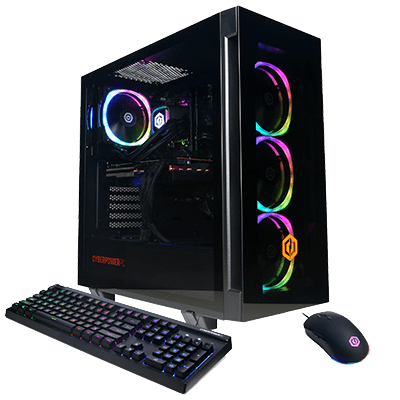
CyberpowerPC: Customization King, But With Trade-offs
CyberpowerPC stands out for its customization. They offer an almost overwhelming number of options, letting you fine-tune every aspect of your build. You have control over the case, cooling solution, motherboard, and RAM. Their website makes navigating these choices easy.
You can choose from a huge selection of cases – everything from minimalist designs to flashy RGB-laden options. They offer air coolers, AIO liquid coolers, and custom water cooling loops (though custom loops exceed the $1500 budget). Component selection is also extensive, with options from both Intel and AMD, and a variety of GPUs from NVIDIA and AMD.
However, this customization has downsides. Build quality can sometimes be inconsistent. Reports on Reddit and tech reviews mention less-than-ideal cable management and occasional minor component issues. Shipping times can also be longer than with other prebuilt vendors, as they’re building each system to order. Customer service experiences vary; some users report quick responses, while others struggle with issue resolution.
CyberpowerPC offers several series, including the Gamer Xtreme which focuses on bang-for-your-buck, and the King series, which leans towards higher-end components and aesthetics. A typical $1500 CyberpowerPC build might include an AMD Ryzen 7 7700X processor, an NVIDIA GeForce RTX 4060 Ti graphics card, 16GB of DDR5 RAM, a 1TB NVMe SSD, and a 650W power supply. This is a solid configuration for 1440p gaming.
Skytech Gaming: Pre-Optimized Performance, Streamlined Experience
Skytech Gaming takes a different approach than CyberpowerPC. They focus on pre-optimized builds, selecting components that work well together. This means less customization but potentially better out-of-the-box performance and stability. They emphasize a streamlined experience to get you gaming quickly.
Their build quality reputation is generally positive. They pay attention to detail, with clean cable management and a professional finish. This is consistently mentioned in reviews and customer feedback. They don’t offer the same level of customization as CyberpowerPC, but they do offer a selection of pre-configured options to choose from.
The downside is less freedom. If you have very specific component preferences, Skytech might not be the best choice. If you’re happy to let them handle component selection, you’ll likely get a well-balanced and reliable system. They are a good option for a hassle-free experience.
A $1500 Skytech Gaming build might feature an Intel Core i5-13600K processor, an NVIDIA GeForce RTX 4060 Ti, 16GB of DDR5 RAM, a 1TB NVMe SSD, and a 650W power supply. This configuration is similar to the CyberpowerPC example, but Skytech prioritizes component synergy and system stability. YouTube reviews consistently praise their out-of-box performance.
Skytech Nebula Gaming PC Review - Is it Worth the Hype? (RTX 4070 Build)
Tech Deals & Builds
Watch on YouTube →ASUS Gaming PCs: Premium Build Quality and Brand Reputation
ASUS has a strong brand reputation and excellent build quality. They are a well-respected name in the PC industry, and their gaming PCs reflect that. Their ROG Strix and TUF Gaming lines offer a blend of performance, aesthetics, and reliability.
ASUS ROG Strix systems feature premium components, robust cooling, and eye-catching designs. They are known for attention to detail and high-quality materials. The TUF Gaming line offers a more affordable option, but maintains good build quality and performance. Both lines benefit from ASUS’s PC hardware experience.
However, this quality comes at a price. ASUS gaming PCs typically cost more than comparable systems from CyberpowerPC or Skytech. You pay a premium for the brand name and higher build quality. This is a trade-off between price and peace of mind.
A $1500 ASUS ROG Strix build might include an Intel Core i5-13600K processor, an NVIDIA GeForce RTX 4060 Ti, 16GB of DDR5 RAM, a 1TB NVMe SSD, and a 650W power supply. The key difference with ASUS is the attention to detail in the build, including cable management, component selection, and overall aesthetics. You pay for a finished product that feels more polished.
Component Breakdown: What You Get For Your $1500
Here is a breakdown of the typical components in a $1500 gaming PC from each brand. The GPU is the most important component for gaming performance. At this price point, you generally find an NVIDIA GeForce RTX 4060 Ti or an AMD Radeon RX 7700 XT. Both cards deliver excellent 1440p gaming performance.
The CPU is critical, but you can use a slightly less expensive processor and still have a great gaming experience. Common choices include the Intel Core i5-13600K/14600K or the AMD Ryzen 7 7700X. These processors offer a good balance of performance and price. The choice between Intel and AMD often comes down to personal preference and specific game optimizations.
RAM is another important consideration. 16GB of DDR5 RAM is the sweet spot for most modern games. You might be able to get away with 16GB, but 32GB provides more headroom for future games and multitasking. Storage should definitely be a fast NVMe SSD – 1TB is a good starting point, but 2TB is preferable if you have a large game library.
The power supply (PSU) should be at least 650W, and preferably 750W, to provide enough headroom for the components and potential upgrades. Look for a PSU with an 80+ Gold rating for efficiency. The motherboard should be a compatible model with the chosen CPU and RAM, and offer sufficient features for your needs.
- GPU: NVIDIA GeForce RTX 4060 Ti / AMD Radeon RX 7700 XT
- CPU: Intel Core i5-13600K/14600K / AMD Ryzen 7 7700X
- RAM: 16GB or 32GB DDR5
- Storage: 1TB or 2TB NVMe SSD
- PSU: 650W-750W 80+ Gold
- Motherboard: Compatible with CPU & RAM
Gaming PC Comparison: Under $1500 (2024)
| Brand | CPU (Quality/Value) | GPU (Model & Performance) | RAM (Speed/Capacity) | Storage (Type/Size) | PSU (Wattage/Efficiency) | Cooling (Type/Effectiveness) |
|---|---|---|---|---|---|---|
| CyberpowerPC | Generally offers strong value with current-generation Intel Core i5 or AMD Ryzen 5 processors. Configurations often prioritize CPU performance for the price. | Typically includes NVIDIA GeForce RTX 4060 or AMD Radeon RX 7600, capable of 1080p and 1440p gaming on medium to high settings. | 16GB DDR5 RAM at speeds around 5200MHz is common, providing a good balance of speed and capacity for modern games. | 500GB - 1TB NVMe SSD for fast boot and load times, sometimes paired with a secondary HDD for bulk storage. | 650W 80+ Bronze certified power supply is frequently found, providing sufficient power for the components. | Air cooling solutions are standard, offering adequate thermal performance for the components, though may be louder under heavy load. |
| Skytech Gaming | Focuses on balanced builds, often utilizing Intel Core i5 or AMD Ryzen 5 processors. Skytech frequently features aesthetically pleasing builds. | Often equipped with NVIDIA GeForce RTX 4060 Ti or AMD Radeon RX 7700 XT, offering improved performance over the base RTX 4060/RX 7600, targeting 1440p gaming. | 16GB DDR5 RAM, often at higher speeds (5600MHz or greater) than CyberpowerPC's base offerings, potentially improving performance in some titles. | 1TB NVMe SSD is standard, providing ample storage for several games and applications. | 650W - 750W 80+ Gold certified power supplies are more common, indicating higher efficiency and potentially better component longevity. | Air cooling with multiple fans is typical, providing good airflow and moderate noise levels. |
| ASUS Gaming PC | ASUS prebuilts often feature a premium feel and build quality, utilizing Intel Core i5 or AMD Ryzen 5 processors. Configurations can be more diverse. | Typically includes NVIDIA GeForce RTX 4060 or RTX 4060 Ti. ASUS often prioritizes brand recognition and aesthetics. | 16GB DDR5 RAM, with speeds varying depending on the model, generally in the 4800MHz - 5200MHz range. | 500GB - 1TB NVMe SSD. Some models may include a smaller SATA SSD or HDD alongside the NVMe drive. | 650W 80+ Bronze or Gold certified power supplies, depending on the specific configuration. | Air cooling is standard, but ASUS may incorporate more refined fan designs and airflow management for quieter operation. |
Illustrative comparison based on the article research brief. Verify current pricing, limits, and product details in the official docs before relying on it.
Real-World Gaming Performance: Benchmarks and Expectations
Let’s look at how these PCs perform in actual games. According to recent benchmarks from YouTube channels like Hardware Unboxed, a system with an RTX 4060 Ti and a Ryzen 7 7700X can achieve around 100-120 FPS in God of War Ragnarok PC at 1080p with high settings. At 1440p, that number drops to around 70-80 FPS.
For Ghost of Tsushima PC, the same system can expect around 90-110 FPS at 1080p with high settings, and around 60-70 FPS at 1440p. These numbers can vary depending on the specific settings and the overall system configuration. It’s important to remember that these are just averages, and your mileage may vary.
A $1500 PC won’t max out every game at 4K. However, with some settings adjustments – lowering shadow quality, disabling ray tracing, and reducing texture resolution – you can achieve playable framerates in many titles. 1440p gaming is where these systems really shine, offering a great balance of visual fidelity and performance.
The impact of graphics settings on performance is significant. Lowering settings like shadows and anti-aliasing can provide a substantial FPS boost, especially in demanding games. Experimenting with different settings is key to finding the optimal balance between visual quality and performance.
Cyberpower vs Skytech vs ASUS: $1500 Gaming PC Battle! (Benchmarks Included)
TechRaptor Reviews
Watch on YouTube →Warranty, Support, and Long-Term Ownership
Warranty and support are crucial considerations when buying a prebuilt gaming PC. CyberpowerPC typically offers a one-year warranty on parts and labor, with options to extend the warranty for an additional fee. Skytech Gaming also offers a one-year warranty, with a focus on fast and responsive customer support. ASUS offers a similar one-year warranty on their ROG Strix and TUF Gaming systems.
Customer support experiences seem to be the most variable aspect. CyberpowerPC has received mixed reviews, with some customers reporting long wait times and difficulty getting issues resolved. Skytech Gaming generally receives positive feedback for their customer service, with many customers praising their responsiveness and helpfulness. ASUS also has a good reputation for customer support, but their response times can sometimes be slower.
Upgradeability is another important factor. Most $1500 gaming PCs offer some degree of upgradeability, allowing you to swap out components like the GPU, RAM, or storage in the future. However, the motherboard and PSU may limit your options. It's worth considering the potential for future upgrades when making your purchase.
You can find more information about warranties and support on the following websites: CyberpowerPC (https://www.cyberpowerpc.com/warranty/), Skytech Gaming (https://skytechgaming.com/pages/warranty), and ASUS (https://www.asus.com/support/).
No comments yet. Be the first to share your thoughts!