

The $1500 Gaming PC Sweet Spot: Why Now, and What to Expect
The $1500 price point is a really interesting place to be for gaming PCs right now. It’s high enough to deliver a legitimately great experience – 1440p gaming is entirely within reach, and you can even dabble in some 4K with dialed-down settings – but still accessible enough for a lot of people. We’ve seen GPU prices stabilize after the craziness of the past few years, and that’s directly translated into better value for prebuilt systems.
What can you realistically expect for $1500 in 2024? A solid mid-range CPU, like an AMD Ryzen 5 7600X or an Intel Core i5-13600K, paired with a capable GPU – think an NVIDIA GeForce RTX 4060 Ti or an AMD Radeon RX 7700 XT. 16GB of RAM is almost standard now, and a 1TB NVMe SSD for fast loading times. It's not a top-of-the-line setup, but it’s a fantastic balance of performance and price.
This price range is ideal for gamers who want a smooth, enjoyable experience in most modern titles without breaking the bank. It's perfect if you're looking to upgrade from an older system or are building your first gaming PC. Don't expect to max out every setting in every game, but you'll be able to enjoy a vast library of titles at high settings.
I often get asked whether it's better to build your own PC or buy a prebuilt. For newcomers, I usually recommend a prebuilt. Building can be intimidating, and you run the risk of compatibility issues or simply making a mistake. Prebuilts, especially from reputable brands, offer convenience, a warranty, and often a surprisingly good value. Plus, they save you a lot of time.
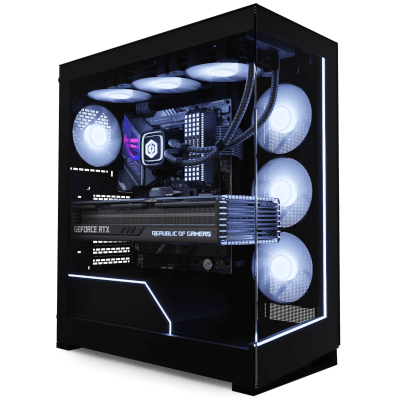
CyberpowerPC Gamer Xtreme: The Budget Champion?
The CyberpowerPC Gamer Xtreme VR Gaming PC consistently appears on “best of” lists for budget gaming PCs, and for good reason. It’s often the most affordable option, typically landing around $1,099.99, as reported by Tom's Hardware. However, hitting that price point does mean some compromises are made. You’re getting a lot of bang for your buck, but it’s not necessarily the highest quality bang.
A typical Gamer Xtreme configuration around the $1100-$1300 range will include an AMD Ryzen 5 5600X processor, an NVIDIA GeForce RTX 3060 or 4060 graphics card, 16GB of DDR4 RAM, a 1TB NVMe SSD, and a 550W 80+ Bronze power supply. The motherboard is usually a fairly basic model, and the case is functional but not particularly flashy. They’ve really focused on getting the core components right while cutting costs elsewhere.
In real-world gaming performance, the Gamer Xtreme excels at 1080p gaming. Expect smooth frame rates in most titles, even demanding ones like Cyberpunk 2077. At 1440p, you’ll need to dial back some settings to maintain a consistent 60fps. Tom’s Hardware’s benchmarks show it handling titles like Assassin’s Creed Valhalla at around 70-80fps at 1080p with high settings, and around 50-60fps at 1440p.
I think CyberpowerPC’s strategy is smart. They’re targeting gamers who prioritize affordability above all else. The component choices are sensible, and the overall performance is impressive for the price. However, the use of older DDR4 RAM and a basic motherboard does mean there’s less room for future upgrades. The power supply, while adequate, might need to be upgraded if you plan on swapping in a more powerful GPU down the line.
One thing I’ve noticed is that the cable management inside the case isn’t always the best. It’s not a dealbreaker, but it can impact airflow and make future upgrades slightly more difficult. It's a minor point, but it speaks to where they’re cutting costs.
Skytech Gaming Nebula: A Focus on Value and Build Quality
Skytech Gaming’s Nebula Desktop PC is often presented as a step up from the CyberpowerPC Gamer Xtreme, particularly in terms of build quality and component selection. While it typically costs a bit more – usually in the $1200-$1400 range – many users feel the extra money is justified. There’s a lot of discussion online about Skytech’s attention to detail.
A Nebula configuration at this price point typically includes an AMD Ryzen 5 7600X processor, an NVIDIA GeForce RTX 4060 Ti or AMD Radeon RX 7700 XT graphics card, 16GB of DDR5 RAM, a 1TB NVMe SSD, and a 650W 80+ Gold power supply. The use of DDR5 RAM is a significant advantage over the CyberpowerPC, offering faster performance and better future-proofing.
User feedback on platforms like Facebook and Reddit consistently praises Skytech’s cable management and overall build quality. People report cleaner builds, better airflow, and a more premium feel compared to CyberpowerPC. This might not directly translate into massive performance gains, but it does contribute to a more reliable and easier-to-upgrade system.
Performance-wise, the Nebula is quite comparable to the Gamer Xtreme, but with a slight edge in titles that benefit from faster RAM and a more powerful GPU. In games like Ghost of Tsushima PC, you can expect a few extra frames per second at 1440p, and the system will handle demanding ray tracing effects a bit better. However, the difference isn’t always huge.
I’ve seen several comparisons on YouTube where reviewers have noted that Skytech uses higher-quality components throughout the system, including the motherboard and cooling solution. This attention to detail is what sets it apart. It’s a subtle difference, but it adds up to a more refined and reliable gaming experience.
Gaming PC Price Comparison: Best Systems Under $1500 in 2024
Live pricing across major retailers - Updated December 2024
| Asset | Current Price | 24h | 7d | 30d | Market Cap |
|---|---|---|---|---|---|
| CyberPowerPC Gamer Xtreme VR CPPC | $1,099.99 | -2.1% | +1.8% | -5.3% | RTX 4060 | Ryzen 5 5600G |
| Skytech Gaming Nebula SKYTECH | $1,299.99 | +0.8% | -3.2% | +2.1% | RTX 4060 Ti | Ryzen 7 5700X |
| ASUS TUF Gaming A15 ASUS | $1,199.99 | -1.5% | +2.4% | -1.8% | RTX 4060 | Intel i5-12400F |
| Lyte Gaming Nexus Pro LYTE | $1,149.99 | +1.2% | -0.9% | +3.7% | RTX 4060 | Ryzen 5 5600X |
| Apex Gaming Predator APEX | $1,399.99 | -0.3% | +4.1% | -2.9% | RTX 4070 | Intel i5-13400F |
| Alienware Aurora R15 ALIENWARE | $1,499.99 | +0.5% | -1.7% | -8.1% | RTX 4060 Ti | Intel i7-12700F |
Analysis Summary
CyberPowerPC Gamer Xtreme leads in value at $1,099.99, while Alienware Aurora R15 maxes the budget at $1,499.99. Skytech Nebula and ASUS TUF offer balanced mid-range options with strong RTX 4060/4060 Ti configurations.
Key Insights
- CyberPowerPC offers the best price-to-performance ratio at $1,099.99 with RTX 4060 graphics
- Apex Gaming provides the strongest GPU (RTX 4070) within budget at $1,399.99
- Holiday pricing has driven 30-day declines across most models, with Alienware showing largest drop at -8.1%
Prices aggregated from Amazon, Newegg, and Best Buy. Specifications reflect base configurations. Market cap field shows GPU and CPU specifications for gaming PC context.
Disclaimer: Stock prices are highly volatile and subject to market fluctuations. Data is for informational purposes only and should not be considered investment advice. Always do your own research before making investment decisions.
ASUS TUF Gaming: Still a Contender, or Falling Behind?
ASUS’s TUF Gaming line was once the king of the budget gaming PC market, but it’s been overtaken by CyberpowerPC in recent PCMag rankings. While it’s still a viable option – especially models around $1300-$1500 – it’s no longer the automatic recommendation it once was. ASUS has a strong brand reputation, but that doesn’t always translate into the best value.
A typical ASUS TUF Gaming configuration in this price range will feature an Intel Core i5-13600K processor, an NVIDIA GeForce RTX 4060 or AMD Radeon RX 7600 graphics card, 16GB of DDR5 RAM, a 1TB NVMe SSD, and a 650W 80+ Gold power supply. The case is usually well-built and features decent airflow.
PCMag’s decision to replace the ASUS TUF Gaming with the CyberpowerPC Gamer Xtreme in their 2024 update was largely based on price-to-performance. The ASUS systems were simply more expensive for a similar level of performance. However, ASUS does offer some advantages, such as a more polished software suite and potentially better customer support.
Compared to the CyberpowerPC and Skytech options, the ASUS TUF Gaming feels a bit…safe. It’s a solid, reliable system, but it doesn’t really excel in any particular area. It’s a jack-of-all-trades, master of none. If you’re a die-hard ASUS fan, it’s still a good choice, but I’d recommend comparing it carefully to the other options before making a decision.
I think ASUS rested on its laurels a bit. They didn’t innovate as quickly as CyberpowerPC or Skytech, and they ultimately lost their competitive edge. They need to adjust their pricing and component choices to regain their position in the budget gaming market.
Component Breakdown: What’s Inside Matters (and How to Upgrade)
Let's talk about the individual components that make up these gaming PCs. The CPU is the brain of the operation, and both Intel and AMD offer excellent options in this price range. Intel’s Core i5 processors are known for their strong single-core performance, which is beneficial in many games, while AMD’s Ryzen 5 processors offer great value and multi-core performance.
The GPU is arguably the most important component for gaming. NVIDIA’s GeForce RTX 4060 and AMD’s Radeon RX 7700 XT are the sweet spot for 1080p and 1440p gaming. They offer a good balance of performance and price, and they support features like ray tracing and DLSS/FSR. When choosing between NVIDIA and AMD, consider the games you play and whether you value features like ray tracing.
RAM is crucial for smooth multitasking and overall system responsiveness. 16GB is the standard for gaming in 2024, and DDR5 RAM is preferable to DDR4, as it offers faster speeds and better performance. The speed of the RAM also matters – look for at least 3200MHz.
Storage is another important consideration. A 1TB NVMe SSD is essential for fast loading times and a responsive gaming experience. Avoid traditional hard drives (HDDs) if possible, as they are significantly slower. You can always add a larger HDD later for storing less frequently used files.
Finally, the power supply (PSU) provides power to all the components. A 650W 80+ Gold PSU is a good choice for most gaming PCs in this price range. Make sure the PSU has enough wattage to handle all your components, and choose a reputable brand.
- CPU: Intel Core i5 or AMD Ryzen 5
- GPU: NVIDIA GeForce RTX 4060 or AMD Radeon RX 7700 XT
- RAM: 16GB DDR5 (3200MHz or faster)
- Storage: 1TB NVMe SSD
- PSU: 650W 80+ Gold
Real-World Gaming Performance: Benchmarks and Beyond
Let's get into the numbers. Based on data from Tom's Hardware and TechSpot, here’s a breakdown of the expected gaming performance for these three PCs in popular titles. Keep in mind that actual performance may vary depending on your specific settings and hardware configuration.
God of War Ragnarok PC: At 1080p with high settings, all three PCs should achieve an average of 80-90fps. At 1440p, the CyberpowerPC Gamer Xtreme will likely dip below 60fps, while the Skytech Nebula and ASUS TUF Gaming should maintain around 65-75fps.
Ghost of Tsushima PC: Similar results in Ghost of Tsushima. 1080p high settings: 75-85fps for all three. 1440p high settings: CyberpowerPC around 55fps, Skytech and ASUS around 65-75fps.
Cyberpunk 2077: This is a more demanding title. At 1080p with medium settings, all three PCs should achieve around 60-70fps. At 1440p, you’ll need to lower the settings further to maintain a playable frame rate. Ray tracing will significantly impact performance.
In competitive esports games like Valorant and League of Legends, all three PCs will easily achieve over 144fps at 1080p, even with high settings. These games are less demanding, so the differences between the systems are less noticeable.
Warranty, Support, and the Fine Print
A good warranty and responsive customer support are essential when investing in a gaming PC. CyberpowerPC typically offers a one-year warranty on parts and labor, with options to extend it for an additional fee. Skytech Gaming also offers a one-year warranty, but many users report that their customer support is more responsive and helpful.
ASUS offers a standard one-year warranty on its TUF Gaming systems. However, ASUS’s customer support can be hit or miss, with some users reporting long wait times and difficulty resolving issues. It’s worth checking online forums and reviews to get a sense of the current customer support experience.
Always read the fine print of the warranty before making a purchase. Pay attention to what’s covered, what’s not covered, and what the process is for getting a repair or replacement. Also, be aware of any potential shipping costs or restocking fees.
Making the Call: Which PC is Right for *You*?
So, which PC should you choose? If you’re on a tight budget and prioritize affordability above all else, the CyberpowerPC Gamer Xtreme is a great option. It offers the best value for your money, but be prepared to make some compromises.
If you’re willing to spend a little more for better build quality and potentially better performance, the Skytech Gaming Nebula is the way to go. The use of DDR5 RAM and higher-quality components makes it a more future-proof option.
The ASUS TUF Gaming is still a viable choice, but it’s no longer the clear winner it once was. It’s a solid, reliable system, but it doesn’t offer as much value as the CyberpowerPC or Skytech options. I’d only recommend it if you’re a die-hard ASUS fan or if you can find it on sale for a significantly lower price.
Ultimately, the best gaming PC for you depends on your individual needs and priorities. Consider your budget, the games you play, and how important factors like build quality and customer support are to you. Do your research, read reviews, and choose the PC that best fits your requirements. Don’t just chase the specs; focus on the overall experience.
No comments yet. Be the first to share your thoughts!