

Wilds is a mess on PC
The PC release of Monster Hunter Wilds has been…rough. Initial reports indicate surprisingly low performance for a game that, visually, doesn’t appear to be pushing the absolute limits of current hardware. It’s a particularly strange situation considering Capcom’s generally strong track record with PC ports; titles like Monster Hunter: World and Rise ran reasonably well on a variety of systems. This isn’t to say those games were perfect, but the issues with Wilds feel fundamentally different.
Digital Foundry’s analysis highlights a core problem: an overwhelming number of DLC checks being performed by the game, even for those who haven’t purchased any additional content. These checks are hammering the CPU, creating a significant bottleneck that impacts performance across the board. It’s not a simple case of needing a more powerful graphics card; even high-end systems are struggling. Frankly, it’s a puzzling issue, and one that has left many PC gamers frustrated.
The performance issues aren’t consistent stuttering, but a pervasive drag on the entire system. It appears the game is constantly verifying the presence of downloadable content, regardless of whether it’s installed. This constant checking isn’t just impacting frame rates, it’s also affecting responsiveness, making the game feel sluggish even at lower settings. The sheer quantity of these checks – 'thousands upon thousands,' according to Digital Foundry – is what sets this apart from typical game loading times or asset streaming.
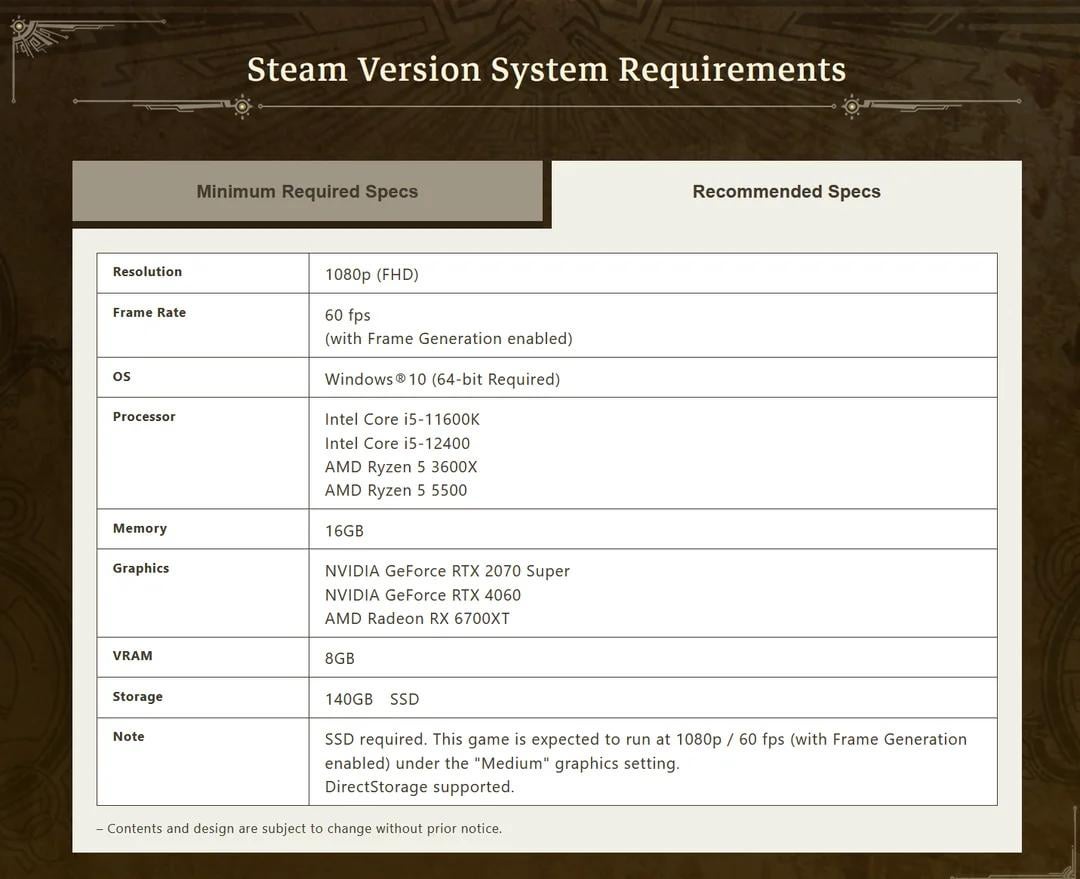
The DLC check bottleneck
Let's get into the weeds a bit, but I'll try to keep it understandable. These 'DLC checks' aren’t simply verifying if you own a piece of content. They appear to be a much more granular process, checking the integrity of individual files within those DLC packages. The game is essentially cataloging a massive amount of potential content, even if you haven't downloaded it. This is where the CPU gets bogged down, as it's handling all that file system interaction.
It’s a departure from how most games handle downloadable content. Typically, a game loads assets as needed, streaming them from storage. Wilds seems to be preemptively verifying everything, creating a constant strain on the processor. This constant verification is what’s causing the performance hit, and it’s happening even on systems with fast SSDs. The problem isn’t the speed of the storage, it’s the sheer volume of checks.
Why Capcom implemented this system is a matter of speculation. One theory is that it’s an attempt to prevent tampering with game files, acting as a form of anti-cheat or anti-mod protection. Another possibility is that it’s intended to streamline the loading of future DLC, pre-verifying content so it’s ready to go when a player purchases it. Whatever the reason, the execution has clearly backfired. It’s a system that’s prioritizing security or future convenience over current performance.
High-end hardware is failing
The performance problems aren’t limited to older hardware. Digital Foundry’s testing shows that even a high-end system with an RTX 4090 and an Intel Core i9-14900K is struggling to maintain a consistently smooth experience at 1440p, even with settings dialed down. The Ryzen 7 7800X3D, a CPU often praised for its gaming performance, also exhibits noticeable stuttering and frame drops.
At 1080p, the situation improves, but the CPU bottleneck remains. Lowering graphics settings helps to some extent, but the core issue—the constant DLC checks—persists. The experience isn’t necessarily unplayable on these systems, but it’s far from the smooth, responsive gameplay that PC gamers expect. The game feels sluggish and unresponsive, even with powerful hardware.
Performance seems to be more heavily impacted by CPU architecture than GPU. While both Intel and AMD CPUs are affected, some reports suggest that AMD processors are experiencing more significant performance drops. This could be due to differences in how the CPUs handle the file system interactions required by the DLC checks. It's not a clear-cut win for either side, but the CPU seems to be the primary limiting factor across all tested configurations.
- RTX 4090 / i9-14900K: Struggles to maintain smooth 1440p performance.
- Ryzen 7 7800X3D: Noticeable stuttering and frame drops.
- CPU Architecture: AMD CPUs may be more heavily impacted than Intel.
Monster Hunter Wilds PC Performance Expectations (2026 Release)
| CPU Tier | 1080p Experience | 1440p Experience | 4K Experience |
|---|---|---|---|
| High-End (e.g., Intel Core i9 or AMD Ryzen 9) | Exceptionally Smooth - Consistent high framerates, allowing for maximum visual settings and a responsive feel. | Very Smooth - Excellent performance with high settings. Minor dips during intense action, but generally a fluid experience. | Smooth - Playable at high settings with consistent framerates, though some settings adjustments may be needed to maintain optimal performance. |
| Mid-Range (e.g., Intel Core i7 or AMD Ryzen 7) | Smooth - A consistently enjoyable experience with high settings. Expect to maintain a good framerate in most scenarios. | Playable - Generally smooth gameplay with some settings adjustments required. Expect occasional dips in framerate during large-scale encounters. | Playable - Requires significant settings adjustments to achieve a playable framerate. Visual fidelity will be noticeably reduced. |
| Low-End (e.g., Intel Core i5 or AMD Ryzen 5) | Playable - A functional experience, but requires substantial settings compromises. Expect noticeable dips in framerate and potential stuttering. | Stuttery - Performance will be significantly impacted. Lowering settings to minimum is essential, and even then, smooth gameplay is not guaranteed. | Unplayable - The game is unlikely to run at a playable framerate even with the lowest settings. |
| Enthusiast (e.g., Intel Core i9 Extreme or AMD Ryzen 9 X3D) | Flawless - Maximum settings, high refresh rates easily achievable, and a consistently responsive experience. | Flawless - Similar to 1080p, offering a visually stunning and incredibly smooth experience. | Very Smooth - Capable of delivering a high-quality 4K experience with minimal compromises. Expect excellent visual fidelity and performance. |
| Mid-Range (Older Generation - e.g., Intel Core i7 8700K or AMD Ryzen 7 2700X) | Playable - Expect to lower settings significantly to maintain a consistent framerate. Some stuttering may occur. | Stuttery - Performance will be challenged. Requires extensive settings adjustments and may still experience frequent framerate drops. | Unplayable - Likely to struggle significantly, even at the lowest settings. |
Illustrative comparison based on the article research brief. Verify current pricing, limits, and product details in the official docs before relying on it.
Recommended Rigs: Budget to Ultra
Given the CPU-bound nature of Monster Hunter Wilds’ performance issues, building a rig isn’t just about raw GPU power. We need to prioritize CPUs with strong single-core performance and plenty of threads. Here at PC Reef, we've put together some builds to tackle this game, ranging from budget-friendly to enthusiast-level. Keep in mind these are recommendations as of late 2024, and prices can fluctuate.
Budget (~$800): This build aims for 1080p, low-medium settings. CPU: AMD Ryzen 5 5600. GPU: AMD Radeon RX 6600. RAM: 16GB DDR4 3200MHz. Storage: 1TB NVMe SSD. PSU: 650W 80+ Bronze. This setup won’t deliver a flawless experience, but it should be playable with some compromises. The 5600 offers good value for its performance.
Mid-Range (~$1500): Targeting 1080p high/ultra or 1440p medium settings. CPU: Intel Core i5-13600K. GPU: NVIDIA GeForce RTX 4060 Ti. RAM: 16GB DDR5 5200MHz. Storage: 1TB NVMe SSD. PSU: 750W 80+ Gold. The 13600K provides a significant performance boost over the 5600, and the RTX 4060 Ti offers a solid 1080p/1440p experience.
High-End (~$2500): Aiming for 1440p high/ultra settings. CPU: AMD Ryzen 7 7700X. GPU: NVIDIA GeForce RTX 4070 Super. RAM: 32GB DDR5 6000MHz. Storage: 2TB NVMe SSD. PSU: 850W 80+ Gold. This build provides a substantial upgrade in performance, offering a smoother experience at higher resolutions and settings. The Ryzen 7 7700X is a powerhouse for gaming.
Enthusiast (~$4000+): For those who want the best possible experience, even with the current performance issues. CPU: Intel Core i9-14900K. GPU: NVIDIA GeForce RTX 4090. RAM: 32GB DDR5 6400MHz. Storage: 2TB NVMe SSD. PSU: 1000W 80+ Platinum. This build will push the game as far as it can go, but even with this level of hardware, you’ll still likely encounter some CPU-related limitations. You can find all of these components and pre-built systems at
- Budget (~$800): Ryzen 5 5600 and Radeon RX 6600. This is a 1080p machine that will require low settings to stay playable.
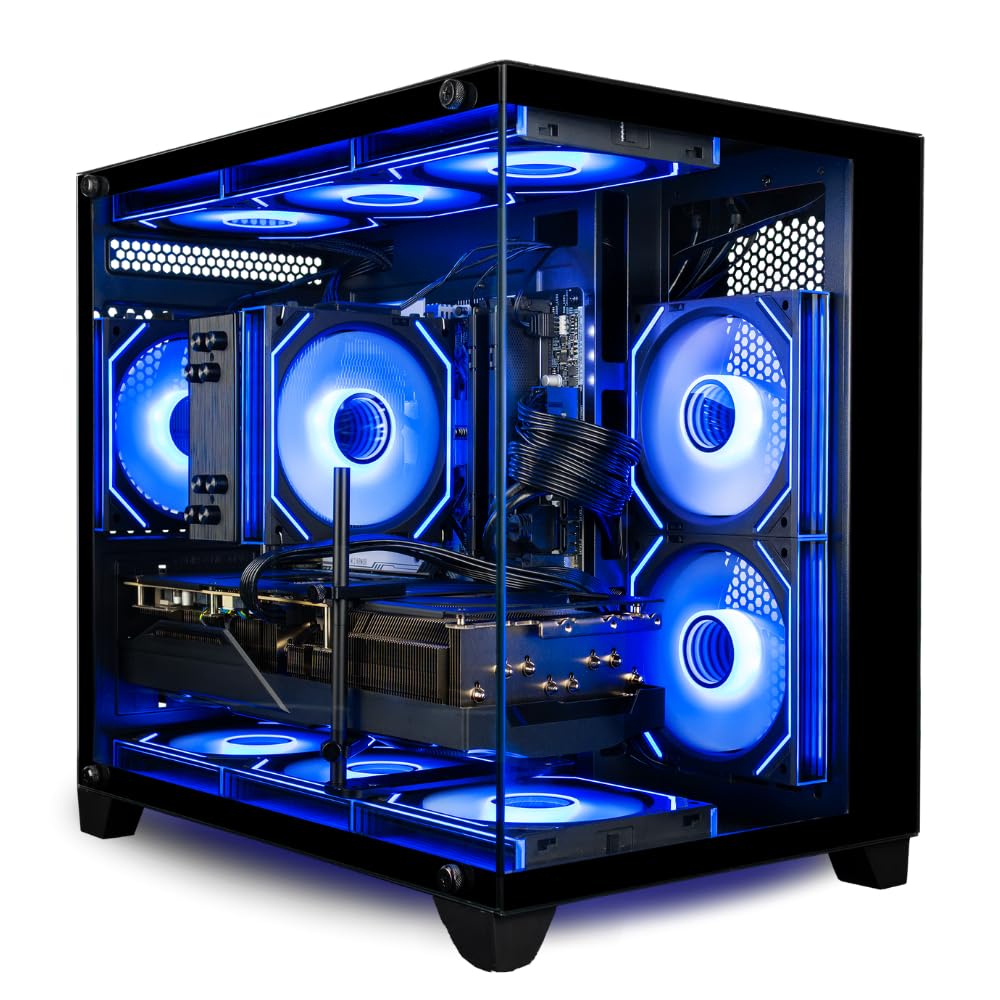
- Skytech Gaming Chronos Mini: A compact and powerful option for the high-end build, perfect for smaller spaces.
- Lyte Gaming Aurora: A customizable option for the enthusiast build, allowing you to tailor the components to your exact needs.
Monster Hunter Wilds PC Performance: Recommended Gaming Rigs for 2026

Intel Core Ultra 5 225F processor · NVIDIA GeForce RTX 5060 8GB graphics card · 32GB DDR5 RAM
This CyberpowerPC offers a strong balance of modern components for a smooth Monster Hunter Wilds experience.

AMD Ryzen 5 5500 processor · NVIDIA RTX 5050 8GB graphics card · 16GB DDR4 RAM
The Skytech Nebula 2 provides a capable entry point for enjoying Monster Hunter Wilds at solid performance levels.

Intel Core Ultra 7 265F processor · NVIDIA GeForce RTX 5070 graphics card · 32GB DDR5 RAM
This Alienware Aurora is a high-performance option designed to push the graphical limits of Monster Hunter Wilds.
Intel Core Ultra 7 265F processor · NVIDIA GeForce RTX 5070 graphics card · 32GB DDR5 RAM
This Alienware Aurora is a high-performance option designed to push the graphical limits of Monster Hunter Wilds.

Intel Core i5-11600KF processor · NVIDIA GeForce RTX 3060 12GB graphics card · 16GB DDR4 RAM
The CyberpowerPC Gamer Xtreme offers a reliable configuration for experiencing Monster Hunter Wilds with good visual fidelity.
As an Amazon Associate I earn from qualifying purchases. Prices may vary.
Optimization Settings: What Works Now?
Right now, tweaking in-game settings is about mitigating the damage rather than achieving a perfect experience. Lowering shadow quality and ambient occlusion has the biggest impact on performance, as these are relatively demanding effects. Reducing the level of detail for foliage and draw distance can also provide noticeable gains. However, be prepared for a visual downgrade.
Resolution scaling (FSR, DLSS, XeSS) is your friend. Enabling one of these technologies can significantly improve frame rates, but you’ll need to find a balance between performance and image quality. DLSS currently appears to offer the best image quality, but FSR is a viable option if you have an AMD GPU. Experiment with different scaling levels to find the sweet spot for your hardware.
Texture quality and anti-aliasing have almost no impact on the current CPU bottleneck. If you have the VRAM, keep them high. NVIDIA and AMD are working on drivers, but don't expect a software update to fix a fundamental engine-level oversight in the near future.
Beyond Settings: Potential Fixes & Workarounds
Players are experimenting with various workarounds, with limited success. Some have reported minor improvements by adjusting BIOS settings to prioritize CPU performance, but these gains are often marginal. Others are trying third-party tools to monitor and optimize CPU usage, but the core issue—the excessive DLC checks—remains.
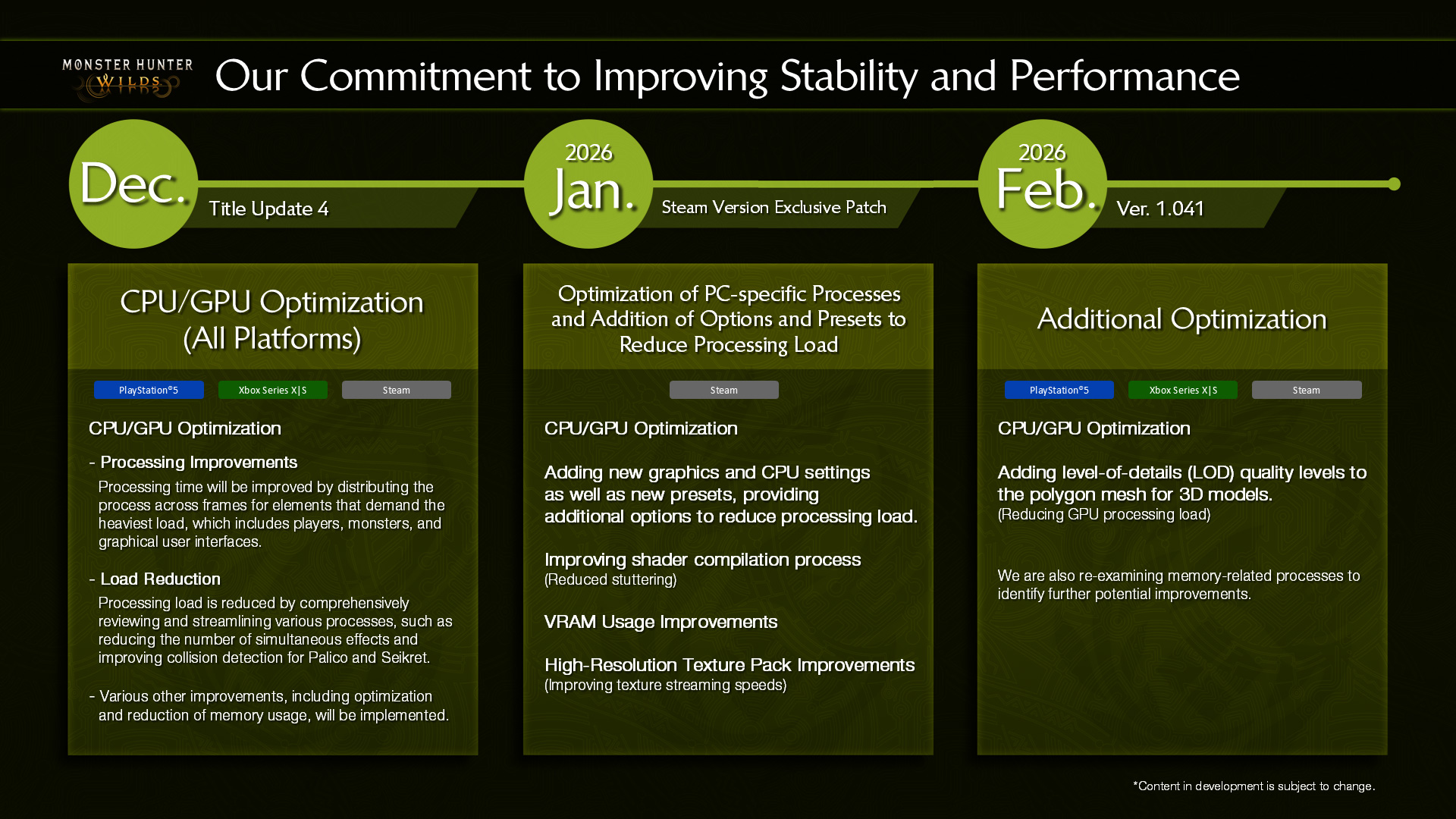
The hope, of course, is that Capcom will release a patch to address the problem. The official Monster Hunter Wilds web manual offers standard troubleshooting steps, like updating drivers and verifying game files, but doesn’t address the specific CPU bottleneck. Capcom is aware of the reports and has acknowledged the issue on social media, but hasn’t provided a detailed roadmap for a fix.
It’s important to manage expectations. There’s no magic bullet solution at the moment. While Capcom’s patch is the most promising potential fix, it’s unclear when it will arrive. In the meantime, focusing on optimizing in-game settings and prioritizing CPU performance in your build are the best strategies.
Essential PC Accessories for Monster Hunter Wilds

Bluetooth 5.4 connectivity · Plug and Play installation · Compact Nano Design
Ensures seamless wireless controller connectivity for an uninterrupted gaming experience.
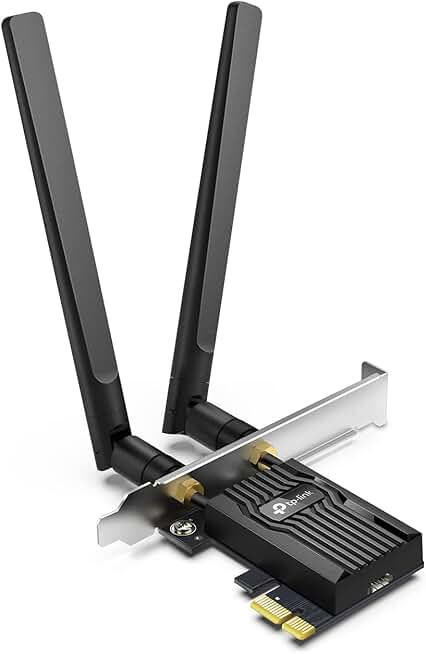
WiFi 6 AX3000 speeds · Bluetooth 5.2 support · Ultra-low latency
Provides high-speed, stable wireless internet with reduced latency for online gameplay.

32GB DDR5 capacity (2x16GB) · 6000MHz speed · Intel XMP 3.0 & AMD Expo compatible
Offers ample capacity and high speed for faster loading times and smoother in-game performance.

Dual-tower heatsink design · Two 140mm fans · High-performance cooling
Keeps your CPU temperatures optimal during demanding gameplay, preventing thermal throttling.
As an Amazon Associate I earn from qualifying purchases. Prices may vary.
No comments yet. Be the first to share your thoughts!